> ## Documentation Index
> Fetch the complete documentation index at: https://support.labex.io/llms.txt
> Use this file to discover all available pages before exploring further.
# Asking Questions on LabEx
> Learn how to ask questions and provide feedback during your LabEx learning journey.
LabEx provides multiple channels for asking questions and providing feedback based on the granularity of the content you're working with.
## Questions About Specific Content
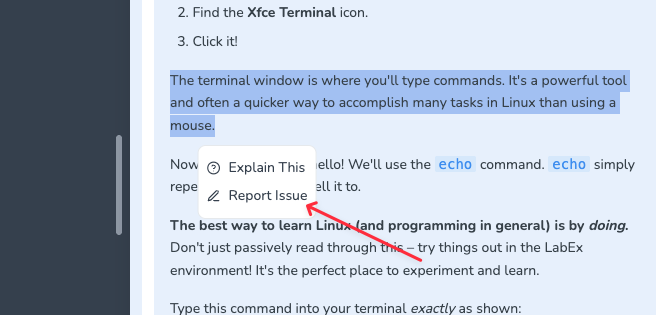
If you have questions or want to report errors in specific paragraphs of content:
1. Select the relevant text in the content.
2. Click the **Report Issue** button.
3. Provide detailed explanation of your question or the issue you've found.
 ## Questions About Specific Lab Step
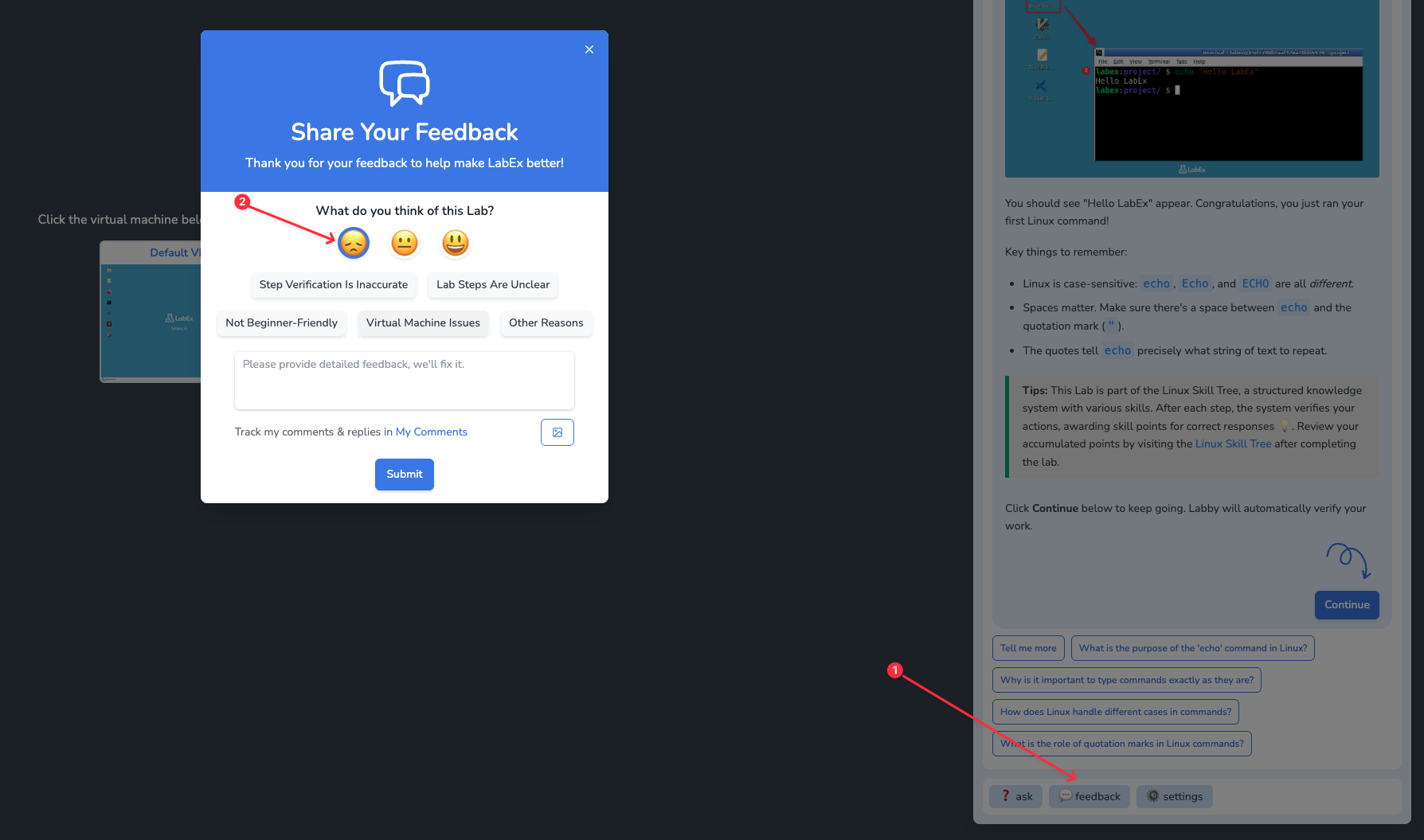
If you have questions about specific step of a lab:
1. Use the **Feedback** button in the Labby dialog box. You can submit feedback for this lab even if you have not started the VM.
2. Click the button and select the sad face emoji.
3. Choose the appropriate question type and provide detailed information.
## Questions About Specific Lab Step
If you have questions about specific step of a lab:
1. Use the **Feedback** button in the Labby dialog box. You can submit feedback for this lab even if you have not started the VM.
2. Click the button and select the sad face emoji.
3. Choose the appropriate question type and provide detailed information.
 ## Questions About Entire Lab Content
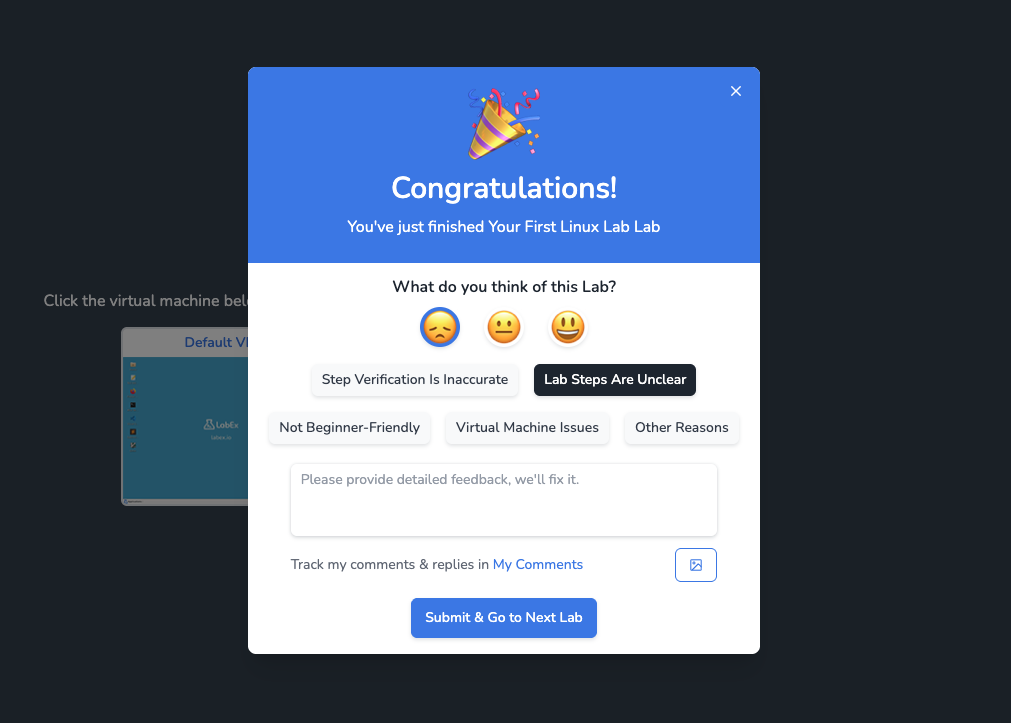
If you have questions about an entire lab:
1. At the end of the lab, use the comment collection box.
2. Select the sad face emoji.
3. Choose the appropriate question type and provide detailed information.
## Questions About Entire Lab Content
If you have questions about an entire lab:
1. At the end of the lab, use the comment collection box.
2. Select the sad face emoji.
3. Choose the appropriate question type and provide detailed information.
 ## Questions About Labby AI Validation
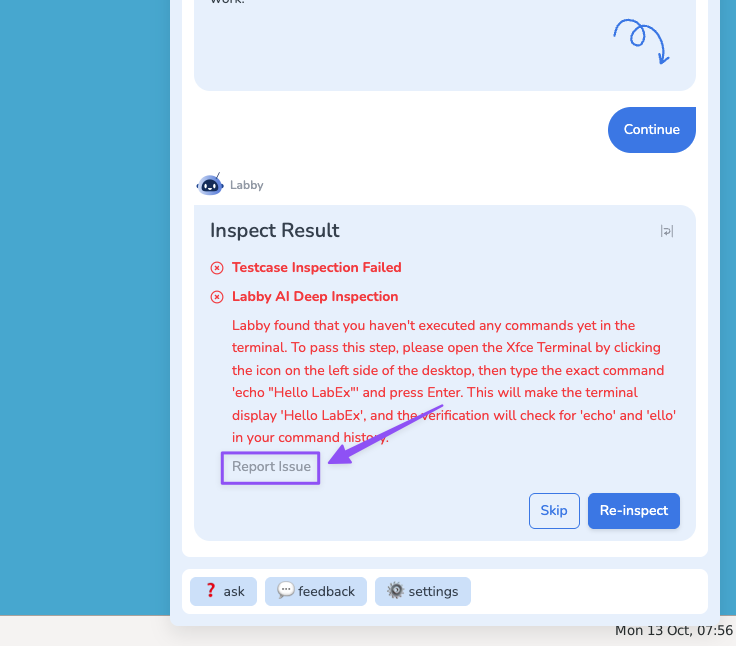
If you believe there is an issue with Labby AI's validation, you can click **Report Issue** to provide feedback after validation fails.
## Questions About Labby AI Validation
If you believe there is an issue with Labby AI's validation, you can click **Report Issue** to provide feedback after validation fails.
 ## Best Practices
1. Adding screenshots is the most recommended approach as it helps us visually understand your issue.
2. If screenshots are not necessary, provide detailed descriptions to help us understand your intent.
## When We Respond
1. We do **not** respond to any content-related questions submitted via email or discord, unless we specifically request you to send details through email.
2. If your question is described in detail or is a correction to our lab content, you are likely to receive a response. Replies will be sent via system email, and you can also find the corresponding question post through the link in the email to follow up.
## Best Practices
1. Adding screenshots is the most recommended approach as it helps us visually understand your issue.
2. If screenshots are not necessary, provide detailed descriptions to help us understand your intent.
## When We Respond
1. We do **not** respond to any content-related questions submitted via email or discord, unless we specifically request you to send details through email.
2. If your question is described in detail or is a correction to our lab content, you are likely to receive a response. Replies will be sent via system email, and you can also find the corresponding question post through the link in the email to follow up.