> ## Documentation Index
> Fetch the complete documentation index at: https://support.labex.io/llms.txt
> Use this file to discover all available pages before exploring further.
# Subscription, account, and support in the LabEx app
> LabEx Pro in the app, profile and sign-out, manage billing on the web, and send diagnostic feedback.
This page covers **LabEx Pro**, your **profile**, **sign-out**, and how to **contact LabEx** with useful diagnostics.
## LabEx Pro in the app
You may open **pricing** from:
* The **sidebar** (iPhone **Upgrade / Pro** control, Mac **Upgrade / Pro** next to your account area)
* The **learning** experience (for example, when a feature needs Pro or a VM rule sends you here)
* **Profile** in contexts that still show a membership button
### What you see
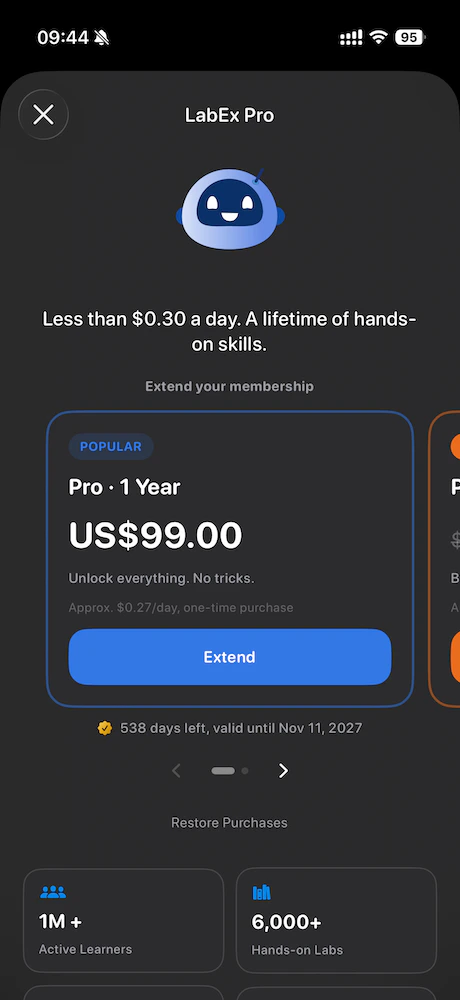
* **Non-Pro**\
You see **plan cards** (for example one-year and two-year options), **Restore purchases**, and short footnotes about App Store billing.
* **Pro (LabEx account)**\
When your LabEx account already has Pro, the app shows **status**, **renewal or expiry information**, and a **Manage billing** link that opens `https://labex.io/account/billings` in the browser.
Purchases complete in the **App Store**. After purchase, the app **syncs** your order with LabEx. If Apple reports an active entitlement on the device, the pricing screen can reflect that **local purchase state** while the rest of the app continues to rely on your **LabEx account** for membership checks.
Web-centric Pro topics (certificates, web payments, regional methods) live
under [LabEx Pro](/en/labex-pro/labex-pro-benifits). Use the app guide for
**in-app purchase and account entry points** first.
 ## Profile and sign-out
### iPhone
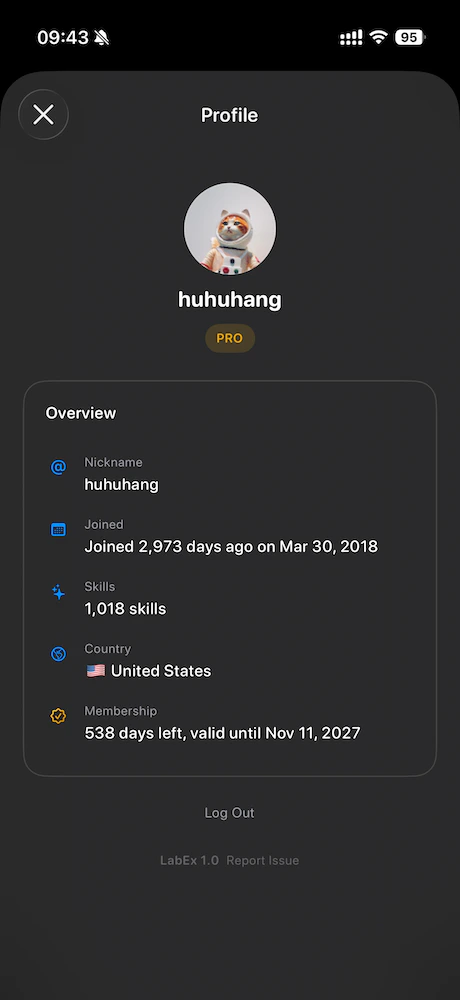
Open **Profile** from the **sidebar avatar**. You see avatar, display name, join context, skills count, country, and membership summary.
**Sign out** clears your session in the app and returns you to the **learning home** welcome state. The app does **not** immediately pop the sign-in sheet again; you choose when to sign in.
### Mac
Open **Account** from the **bottom of the sidebar**. Sign out closes the window and resets the signed-in experience the same way.
## Profile and sign-out
### iPhone
Open **Profile** from the **sidebar avatar**. You see avatar, display name, join context, skills count, country, and membership summary.
**Sign out** clears your session in the app and returns you to the **learning home** welcome state. The app does **not** immediately pop the sign-in sheet again; you choose when to sign in.
### Mac
Open **Account** from the **bottom of the sidebar**. Sign out closes the window and resets the signed-in experience the same way.
 ## Push notifications
If you enabled notifications, LabEx can register your device for **remote push** when you are signed in. Tapping a notification that includes a link uses the same **in-app routing** as other LabEx URLs when supported.
## Send feedback with a log
At the bottom of **Profile**, next to the **app version**, use **Send feedback** (wording may match your app language). This starts an email to **[feedback@labex.app](mailto:feedback@labex.app)** and attaches **`labex-runtime-log.txt`**, a diagnostic file that helps support see recent app and network activity (sensitive values are redacted or masked).
* **iPhone**\
Uses the system mail composer when mail is configured; otherwise you get guidance to **copy the log** or use a `mailto` link.
* **Mac**\
Copies the full log to the **clipboard** and opens **Mail.app** for `mailto` when possible, so the log is easy to paste if Mail is not your default handler.
The footer next to the version may read **Send feedback** or **Report issue** depending on your build; both open the same email flow with the diagnostic attachment.
## More help
* Learning concepts: [Labby AI](/en/using-labex/labby-ai), [Virtual Machine](/en/using-labex/virtual-machine), [FAQ](/en/using-labex/faq)
* Account on the web: [Managing your account](/en/my-account/managing-account)
* General questions: the [LabEx Support Center](/en/using-labex/welcome) and `info@labex.io`
## Push notifications
If you enabled notifications, LabEx can register your device for **remote push** when you are signed in. Tapping a notification that includes a link uses the same **in-app routing** as other LabEx URLs when supported.
## Send feedback with a log
At the bottom of **Profile**, next to the **app version**, use **Send feedback** (wording may match your app language). This starts an email to **[feedback@labex.app](mailto:feedback@labex.app)** and attaches **`labex-runtime-log.txt`**, a diagnostic file that helps support see recent app and network activity (sensitive values are redacted or masked).
* **iPhone**\
Uses the system mail composer when mail is configured; otherwise you get guidance to **copy the log** or use a `mailto` link.
* **Mac**\
Copies the full log to the **clipboard** and opens **Mail.app** for `mailto` when possible, so the log is easy to paste if Mail is not your default handler.
The footer next to the version may read **Send feedback** or **Report issue** depending on your build; both open the same email flow with the diagnostic attachment.
## More help
* Learning concepts: [Labby AI](/en/using-labex/labby-ai), [Virtual Machine](/en/using-labex/virtual-machine), [FAQ](/en/using-labex/faq)
* Account on the web: [Managing your account](/en/my-account/managing-account)
* General questions: the [LabEx Support Center](/en/using-labex/welcome) and `info@labex.io`